
Satellite radio
General information
The channels are offered in predefined packages. The packages must be enabled by telephone.
Navigation bar overview
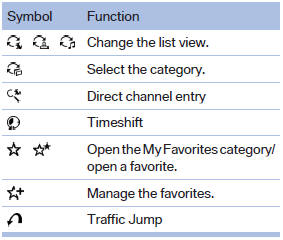
The functions of the navigation bar symbols can also be stored on the programmable memory buttons.
See also:
General information
The system supports you in entering street
names and house numbers by automatically
completing the entry and providing entry comparisons
Stored town/city and street names can be called
up quick ...
The concept
Pressing the Start/Stop button
switches the ignition on or off and
starts the engine.
Automatic transmission: the engine
starts if the brake is depressed
when the Start/Stop button is pre ...
After the ignition is switched off
When the remote control is removed or the ignition
is switched off, the windows can continue
to be operated for approx. 1 minute as long as
no door is opened. ...