
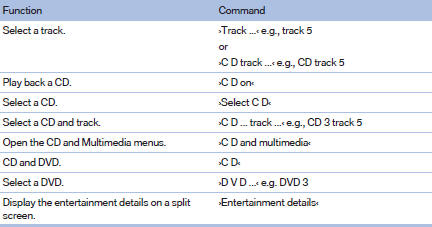
CD/Multimedia
CD/DVD drive
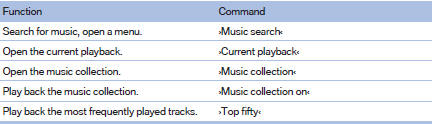
Music collection
External devices

Tone

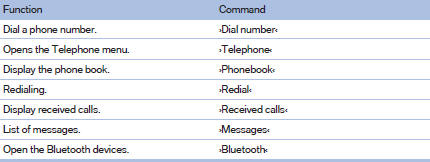
Telephone
Office
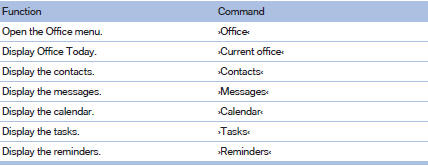
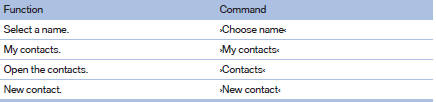
Contacts
BMW Assist or ConnectedDrive

See also:
Calling
Dialing a phone number
1. ›Dial number‹
2. Say the phone number.
3. ›Dial‹
Correcting the phone number
The sequence of digits can be deleted after the
system has repeated the digits.
›Correct ...
Releasing manually
Releasing manually
Press the button with the brake depressed.
The LED and indicator lamp go
out.
Indicator lamp in Canadian
models.
Take the remote control with you
Take the remote cont ...
Reading out loud
Text messages, e-mails, appointment entries,
tasks, and notes can be read out loud.
1. Select the desired message, appointment,
task, or note.
2. Select the symbol.
The following options are a ...