
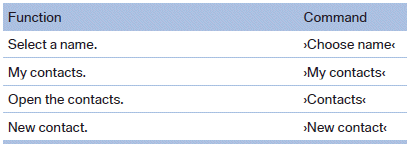
Contacts
See also:
Coolant level
Checking
1. Let the engine cool.
2. Turn the cap of the expansion tank slightly
counterclockwise to allow any excess pressure
to dissipate, and then open it.
3. The coolant level is correct if ...
DOT Quality Grades
Treadwear
Traction AA A B C
Temperature A B C
Conform to Federal Safety Requirements
All passenger car tires must conform to
Federal Safety Requirements in addition to
these grades.◀ ...
Controls
1 Screen, left
2 Screen, right
3 Center armrest, remote control
4 CD/DVD player ...