
Displays in the instrument cluster
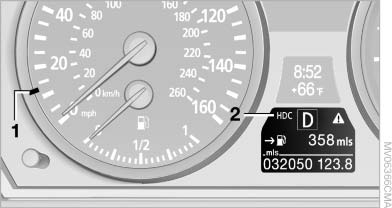
Displays in the instrument cluster
1, Display for target speed
2, HDC display
See also:
Tire tread
Summer tires
Do not drive with a tire tread depth of less than
0.12 in/3 mm.
There is an increased danger of hydroplaning if
the tread depth is less than 0.12 in/3 mm.
Winter tires
Do not driv ...
Text messages
Text messages in combination with a symbol in
the instrument cluster explain a Check Control message and the meaning of the
indicator and
warning lamps. ...
Eject CD/DVD
Press the button
on the CD/DVD player. The
DVD emerges slightly from the drive. ...