
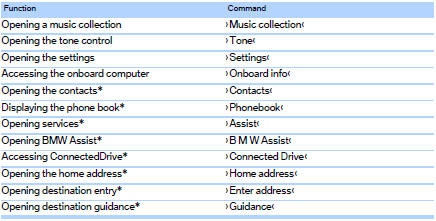
Useful short commands
See also:
Service and warranty
We recommend that you read this publication
thoroughly. Your vehicle is covered by the following
warranties:
▷ New Vehicle Limited Warranty.
▷ Rust Perforation Limited Warranty.
...
Increasing or reducing speed
The speed can be changed in the range from
approx. 4 mph/6 km/h to approx. 15 mph/25 km/
h by pressing the accelerator or brake pedal
lightly.
A target speed within the same range can be
spec ...
Switching the microphone to mute
When a call is active, the microphone can be
muted.
1. "Telephone"
2. "Active calls"
3.
"Microphone mute"
A microphone that has been switched to mute
is autom ...