
Software Update
The vehicle supports various external devices depending on the current software version. With a software update, the vehicle can support new cell phones* or new external devices*.
The updating of the software is done via:
- USB*.
Updates and related current information is available at www.bmw.com/update. - TeleService*.
Existing software can be updated directly via the vehicle.
Displaying the current version
The currently installed software is displayed.
1. "Settings"
2. "Software update"
3. "Show current version"
SelectDesired version* to displayAdditional information*.
Updating software via USB
The software may only be updated when the vehicle is stationary.
1. Store the file for the software-update in the main director of a USB flash drive.
2. Insert the USB flash drive into the USB interface of the USB audio interface in the center armrest. An update via the USB interface in the glove compartment is not possible.
3. "Settings"
4. "Software update"
5. "Update software"
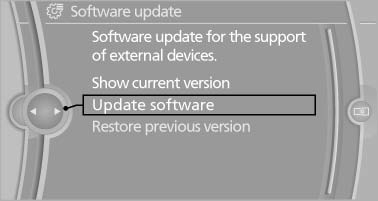
6. If necessary. "USB".
7. "Start update"
8. "OK"
All listed software updates are installed.
Updating software via TeleService
The software may only be updated when the vehicle is stationary.
1. Switch on the ignition.
2. "Settings"
3. "Software update"
4. "Update software"
5. If necessary "TeleService".
6. If necessary, "Start update".
7. "Start update"
8. "OK"
All listed software updates are installed.
To interrupt updating: "Cancel".
Restoring the previous version
If it should become necessary, the software version prior to the last software update can be restored.
The previous version may only be restored when the vehicle is stationary.
1. "Settings"
2. "Software update"
3. "Restore previous version"
4. "OK" Double-click.
All listed software updates are removed.
Note
While the software is being updated or a previous version is being restoredBMW Assist*, Office functions* and the connected devices are temporarily unavailable. Wait several minutes for the functions to become available again.
See also:
Communication
All of the options available to you for mobile
communication with family, friends, business
partners, and service providers are described in
this chapter. ...
Unpairing the mobile phone
1. "Telephone"
2. "Bluetooth® (phone)"
3. Highlight the mobile phone that is to be unpaired.
4. Open "Options".
5. "Remove phone from list" ...
Displaying special destinations in the
map
To display symbols of the special destinations
in the map view:
1. "Navigation"
2. "Map"
3. Open "Options".
4. "Display Points of Interest"
5. Select the ...