
Remote control
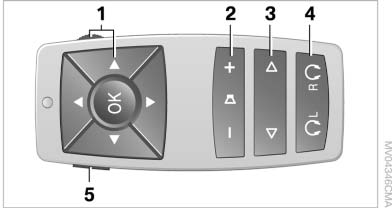
Remote control
1. Menu navigation
2. Volume for headphones with jack plug
3. Changing track or chapter during CD-, DVDor AUX playback, fast forward/rewind
4. Headphones right/left
5. Open start menu for DVD system
See also:
Buttons on controller
MENU
Opens the main menu
RADIO
Opens the Radio menu
CD
Opens the CD/Multimedia
menu
NAV
Opens the Navigation
menu
TEL
Opens the Teleph ...
Route
Different views of the route are available during
destination guidance:
► Arrow view in the instrument cluster and on
the Control Display.
► List of route sections.
► Map view.
...
Information in detail
Range
Displays the estimated cruising range available
with the remaining fuel.
It is calculated based on your driving style over
the last 20 miles/30 km.
If there is only enough fuel left for l ...