
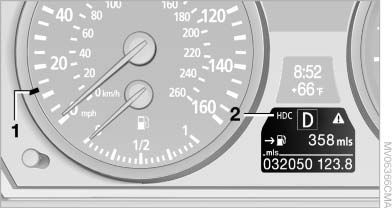
Displays in the instrument cluster
Displays in the instrument cluster
1, Display for target speed
2, HDC display
See also:
After washing the vehicle
After washing the vehicle, apply the brakes
briefly to dry them; otherwise, braking action can
be reduced and corrosion of the brake discs can
occur. ...
Dimensions
Width, height
1. Vehicle height: 57.6 inches / 1,464 mm
2. Vehicle width, without mirrors: 73.2 inches
/ 1,860 mm
3. Vehicle width with mirrors: 82.4 inches
/ 2,094 mm
Length, wheel base
...
Opening/closing the glass sunroof and
sliding visor together
Briefly press the switch twice in
succession in the desired direction
past the resistance point.
The glass sunroof and sliding visor
move together. Pressing the
switch again stops the moti ...