
Messages
General information
The displaying of text messages and emailsfrom the mobile phone depends on whether the mobile phone supports transmission into the vehicle from the mobile phone. Text messages and emailsmay not be supported by the service provider or the function may have to be separately activated. After a mobile phone is paired for the first time, the transmission may take several minutes. Messages are only displayed completely when the vehicle is stopped.
Messages from the auxiliary phoneare not transferred.
To display various messages:
> Text messages.
> Messages from My info.
> Messages from the BMW Concierge service.
> Emailsfrom the mobile phone.
1. "Office"
2. "Messages"
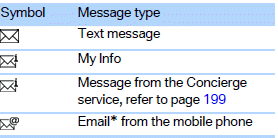
Message type
A symbol indicates the type of message.
 Read message.
 Unread message.
The message list can be filtered if it contains more than one message type.
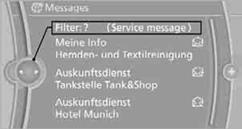
1. "Filter:"
2. Select the message type.
> "All"
All messages are displayed.
> "E-mail"
Only emails from the mobile phone are displayed.
> "Services messages"
Only messages from the BMW Concierge service and My Info are displayed.
> "Text message"
Only text messages from the mobile phone are displayed.
Deleting messagesMessages from the Concierge service, My info, and BMW Onlinecan be deleted.
To delete a message:
1. "Office"
2. "Messages"
3. Select the desired message.
4. Open "Options".
5. Open "Delete message". To delete all messages:
1. "Office"
2. "Messages"
3. Open "Options".
4. "Delete all messages"
Using contact data
Contact data from appointments, tasks, text messages, emails, and notes can be stored or selected.
Having text messages read aloudHaving text messages read aloud.
My InfoStarting destination guidance
1.  Select the desired message.
2. "Start guidance" or "Add as another destination"
Dialing a number in a message
Up to 4 phone numbers can be sent with a message.
1. Select the desired message.
2.  "Call":
If the message contains a number, a telephone connection is established.
 "Select phone number":
If the message contains more than one number, select the desired number from the list. A telephone connection is established.
Saving an address
1.  Select the desired message.
2. Open "Options".
3. "Store contact in vehicle"
1. Select the desired message.
2.  "Start guidance" or "Add as another destination"
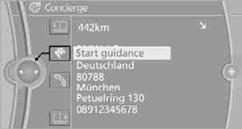
3. Start destination guidance, if necessary.
Dialing a number in a message
Up to 4 phone numbers can be sent with a message.
1. Select the desired message.
2. "Call":
If the message contains a number, a telephone connection is established.
"Select phone number"
If the message contains more than one number, select the desired number from the list. A telephone connection is established.
Saving an address
1. Select the desired message.
2. Open "Options".
3. "Store contact in vehicle"
Displaying additional information
1. Select the desired message.
2. "Further information"
Email Displaying email
1. "Office"
2. "Messages"
3.  Select the desired message.
Displaying email contacts
If the sender and recipient of an email are transferred from the mobile phone, they are displayed in the email.
 "Sender/Recipient"
If the email address is stored in the contacts, the contact is displayed. Select contact to display details.
If the email address is not stored in the contacts, then the display might show only the email address.
Using contact data
Contact data from appointments, tasks, text messages, emails, and notes can be stored or selected.
Having an email read aloud
Having an email read aloud.
See also:
General information
Enclosed areas
Do not let the engine run in enclosed
areas; otherwise, breathing of exhaust fumes
may lead to loss of consciousness and death.
The exhaust gases contain carbon monoxide, an
o ...
The concept
This system can replace up to three different
hand-held transmitters for various types of remote-
controlled equipment, such as garage
doors or lighting systems.
The hand-held transmitter signa ...
Navigation
This chapter describes how you can enter destinations and specify your route
so that your navigation system guides you reliably to your destination. ...