
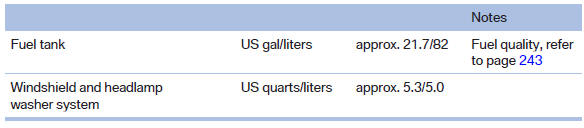
Capacities
See also:
Remove attached parts
following use
Remove auxiliary mirrors, roof or rear luggage
racks which are no longer required following
use.
Attached parts on the vehicle impair the aerodynamics
and increase the fuel consumption. ...
Status field
The following information is displayed in the status
field at the top right:
Time.
Current entertainment source.
Sound output, on/off.
Wireless network reception strength.
Telephone stat ...
BMW Maintenance System
The maintenance system directs you to required
maintenance measures and thereby supports
you in maintaining road safety and the operational
reliability of the vehicle. ...