
Controls
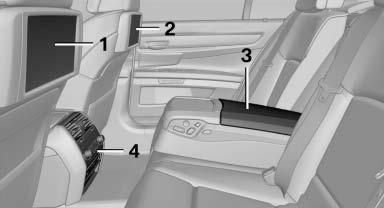
1 Screen, left
2 Screen, right
3 Center armrest, remote control
4 CD/DVD player
See also:
Controls
1 Control Display
2 Controller with buttons
The buttons can be used to open the menus
directly. The controller can be used to select
menu items and create the settings. ...
Lumbar support
The curvature of the seat backrest can be adjusted
in such a way that it supports the lumbar
region of the spine. The lower back and the
spine are supported for upright posture.
▷ Press ...
Condensation under the parked vehicle
When using the automatic climate control, condensation
water develops that exits underneath
the vehicle.
Therefore, traces of condensed water under the
vehicle are normal. ...