
Display
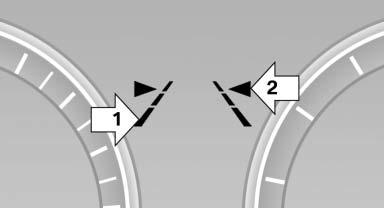
▷ Lines, arrow 1: the system is activated. ▷ Arrows, arrow 2: at least one lane marking was detected and warnings can be issued.
See also:
Refueling
Vehicle equipment
All standard, country-specific and optional
equipment that is offered in the model series is
described in this chapter. Therefore, equipment
is also described that is not avai ...
Interior
Up to five occupants have ample space in the 760i sedan, and passengers in
the backseat of the extended-length 760Li enjoy even more legroom. An Active
Support massage feature is included in the d ...
Bluetooth audio
At a glance
▷ Music files on external devices such as audio
devices or mobile phones can be played
back via Bluetooth.
Use of a mobile phone as an audio source.
▷ The sound is outpu ...