
Tilting the glass sunroof
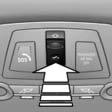
Push switch upward briefly.
- The closed roof is tilted and the sliding visor opens slightly.
- The opened roof closes until it is in its tilted position. The sliding visor stays completely open. Pressing the switch again closes the sliding visor almost completely.
See also:
Timeshift
Approx. one hour of the program being broadcast on the channel currently being
listened to is stored in a buffer. Prerequisite: the signal must be available.
The stored audio track can be played wi ...
Switching off the engine
Always take the remote control with you when
you leave the vehicle.
When parking, apply the parking brake forcefully; otherwise, the vehicle could
begin to roll.
Manual transmission1. Wit ...
Opening the search for special
destinations
Selection of special destinations, such as hotels
or tourist attractions.
1. "Navigation"
2. "Points of Interest"
3. Select the search function. ...