
Driving Experience Switch
The concept
The Driving Experience Switch can be used to adjust the driving dynamics of the vehicle. For this purpose various programs are available for selection that are activated via the two buttons of the Driving Experience Switch and the DSC OFF-button.
Operating the programs
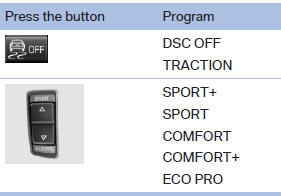
For Dynamic Damper Control, the lower button is labeled with COMFORT.
Automatic program change
The system automatically switches to COMFORT in the following situations:
▷ Failure of Integral Active Steering.
▷ Failure of Dynamic Damping Control.
▷ The vehicle has a flat tire.
See also:
Switching on automatically
Select transmission position R with the engine
running.
The Top View and PDC images are displayed if
the system is switched on via iDrive. ...
Integrated key
Press the button on the back of the remote control,
arrow 1, and pull out the key, arrow 2.
The integrated key fits the following locks:
Driver's door.
Trunk lid.
Storage compartment in t ...
Display on the Control Display
Switching on the backup camera via the
iDrive
With PDC activated:
"Rear view camera"
The backup camera image is displayed. The setting
is stored for the remote control currently in ...