
Interior lamps
General information
The interior lamps, footwell lamps, entry lamps and courtesy lamps are controlled automatically.
The brightness of some of these lamps is influenced by the thumbwheel for the instrument lighting.
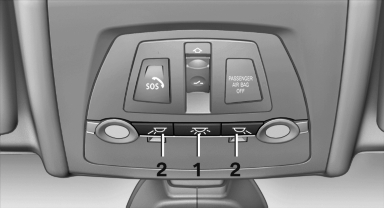
1. Interior lamps
2. Reading lamp
Switching the interior lamps on and off
 Press the button.
To switch off permanently: press the button for approx. 3 seconds.
Switch back on: press button.
Reading lamps
 Press the button.
Reading lamps are located at the front and rear next to the interior lamps.
With the interior lamps shut off, the reading lamps cannot be switched on.
See also:
At a glance
Contacts can be created and edited. The contacts
from the mobile phone are displayed as
well if this function is supported by the mobile
phone. The addresses can be adopted as destinations
for ...
Selecting menu items
Menu items shown in white can be selected
1. Turn the controller until the desired menu
item is highlighted
Turn the controller until the desired menu
item is highlighted
2. Press the control ...
Adjusting the info display
You can select what information from the computer
is to be displayed on the info display of the
instrument cluster.
1. "Settings"
2. "Info display"
3. Select the desired dis ...