
Switching the high beams on and off manually
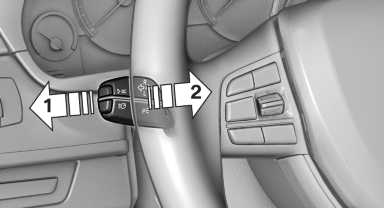
Switching the high beams on and off
manually
▷ High beams on, arrow 1.
▷ High beams off/headlamp flasher, arrow 2.
To reactivate the High-beam Assistant, press the button on the turn signal lever.
See also:
Setting compass zones
Set the compass zone corresponding to the vehicle's
geographic location so that the compass
Setting compass zones
Press the adjustment button for 3‑4 seconds.
The number of the compass zo ...
BMW ActiveHybrid X6
Like other so-called two-mode hybrids, the ActiveHybrid can accelerate
gradually on electric power alone, up to 37 mph in the X6's case. All-wheel
drive and a seven-speed automatic are standard. B ...
BMW 7 Series Owners Manual
h4 {color:#800000}
h3 {color:#0033CC}
h2 {color:#008000}
h1 {color:#FF0000}
...