
Welcome lamps
When parking the vehicle, leave the switch in
position  or
or
 : the parking and interior
lamps light up briefly when the vehicle is unlocked.
: the parking and interior
lamps light up briefly when the vehicle is unlocked.
Activating/deactivating the welcome lamps
1. "Settings"
2. "Lighting"
3. "Welcome light"
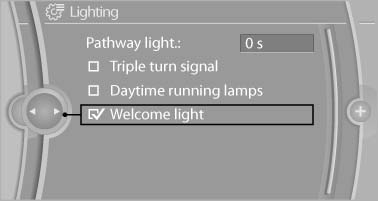
Welcome light
The setting is stored for the remote control currently in use.
See also:
Swapping the telephone and additional telephone
The function of the telephone and additional telephone
can be swapped automatically.
1. "Telephone".
2. "Bluetooth® (phone)".
3. "Swap phone/addit. phone" ...
Selecting menu items
Menu items shown in white can be selected.
1. Turn the controller until the desired menu
item is highlighted.
2. Press the controller.
Menu items in the Owner's Manual
In the Owner's Manual, m ...
Editing or deleting an address
1. "Navigation"
2. "Address book"
3. Highlight the entry.
4. Open "Options".
5. "Edit in Contacts" or "Delete entry" ...