
Engine oil temperature
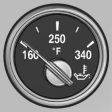 ▷ Cold engine: the pointer is at
the low temperature end.
▷ Cold engine: the pointer is at
the low temperature end.
Drive at moderate engine and vehicle speeds.
▷ Normal operating temperature:
the pointer is in the middle or in the left half of the temperature display.
▷ Hot engine: the pointer is at the high temperature end. A Check Control message is displayed in addition.
See also:
Information at a glance
Info display
Repeatedly pressing the button
on the turn signal lever calls up
the following information on the
info display:
► Range.
► ECO PRO bonus range.
► Average fuel co ...
Displaying the button assignment
Use a finger to touch the buttons. Do not wear
gloves or use objects.
The key assignment is displayed at the top edge
of the screen.
Displaying the button assignment
▷ To display short ...
Safety belts
Observe the adjustment instructions on page
45 to ensure the best possible personal protection.
Before every drive, make sure that all occupants wear their safety belts. Airbags
complement the s ...