
Overview, Instrument cluster with enhanced features
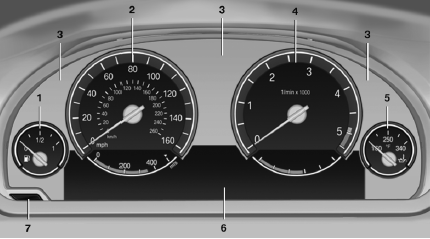
1 Fuel gauge
2 Speedometer
3 Indicator/warning lamps
4 Tachometer
5 Engine oil temperature
6 Electronic displays
7 Display/reset miles
See also:
Emissions
The warning lamp lights up:
The vehicle is producing higher emissions. The trip can be continued. Have the
car checked as soon as possible.
Canadian models display this warning lamp.
The lamp f ...
General information
Lamps and bulbs make an essential contribution
to vehicle safety.
The manufacturer of your vehicle recommends
that you entrust corresponding procedures to
your service center if you are unfamil ...
Central locking system
The concept
The central locking system becomes active
when the driver's door is closed.
The system simultaneously engages and releases
the locks on the following:
Doors.
Trunk lid.
Fuel ...