
Buttons on the remote control
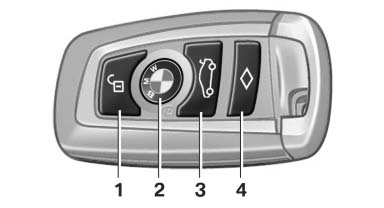
1 Unlocking
2 Locking
3 Opening the trunk lid
4 Panic mode*, headlamp courtesy delay feature
See also:
Pairing/unpairing the mobile phone
General information
The following functions are available:
► Use of a mobile phone as a telephone.
► Use of a mobile phone as an additional telephone.
► Use of a mobile phone a ...
The concept
Top View assists you in parking and maneuvering.
The area around the doors and the road area
around the vehicle are shown on the Control
Display for this purpose. ...
The concept
This system can replace up to three different
hand-held transmitters for various types of remote-
controlled equipment, such as garage
doors or lighting systems.
The hand-held transmitter signa ...