
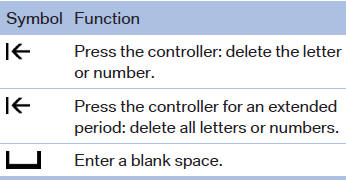
General information
1. Turn the controller: select letters or numbers.
2. Select additional letters or numbers if
needed.
3. "OK": confirm the entry.
See also:
Playback
Loading the CD/DVD player
Insert the CD/DVD with the printed side up.
Playback begins automatically.
Reading can take a few minutes with compressed
audio files.
Starting playback
A CD/DVD is ...
Message from the Concierge service
Starting destination guidance
1. Select the desired message.
2.
"Start guidance" or "Add as another
destination"
3. Start destination guidance, if necessary.
Dialing ...
Climate
1. Airflow directed toward the windshield and side windows
2. Air to the upper body area: Draft-free ventilation
3. Air to the footwell
4. Air distribution, manual
5.&nb ...