
Service history
Perform maintenance work at the service center and have them recorded in the vehicle data. The entries are like a service booklet of the documentation of regular maintenance.
The entered maintenance work can be displayed on the Control Display. Function is available as soon as a maintenance operation has been entered in the vehicle data.
1. "Vehicle Info"
2. "Vehicle status"
3.  "Service required"
4.  "Service history"
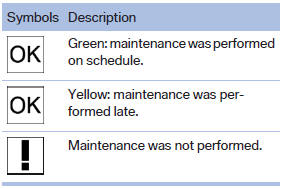
Performed maintenance operations are displayed.
5. Select an entry to call up detailed information.
Symbols
See also:
Automatic update
About twice a year, Sirius performs an update of the channel names and positions.
The update takes place automatically and may take several minutes. ...
Mounts for the lower LATCH anchors
Correctly engage the lower LATCH anchors
Make sure that the lower LATCH anchors have
properly engaged and that the child restraint fixing
system is resting snugly against the backrest;
otherwi ...
Phone book
Displays
The phone book accesses the contacts and
shows all contacts for which a phone number
has been stored. The entries can be selected to
make a call.
1. "Telephone"
2. "Ph ...