
Overview, instrument cluster with enhanced features
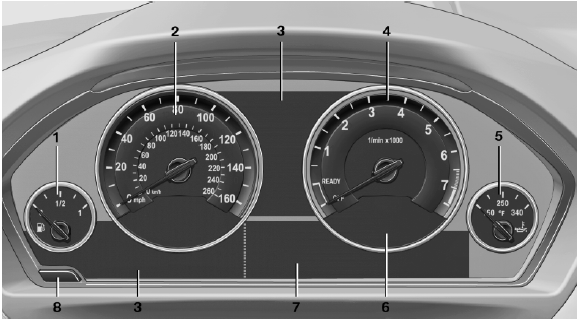
Overview, instrument cluster with enhanced features
1 Fuel gauge
2 Speedometer
3 Indicator/warning lamps
4 Tachometer
5 Engine oil temperature
6 Current fuel consumption
7 Electronic displays
8 Display/reset miles
See also:
General information
Front
Two different driver's seat, exterior mirror, and
steering wheel positions can be stored and retrieved
for each remote control. The adjustment
of the lumbar support is not stored. ...
Length, wheel base
Length, wheel base
1 Wheel base: 110.6 inches/2,810 mm
2 Vehicle length: 182 inches/4,624 mm ...
Indication in the info display
The information from the onboard
computer is shown in the
info display in the instrument
cluster. ...