
Initiating an Emergency Request
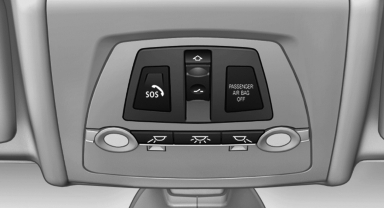
1. Press the cover briefly to open it.
2. Press the SOS button until the LED in the button lights up.
- The LED lights up: an Emergency Request
was initiated.
If the situation allows, wait in your vehicle until the voice connection has been established. - The LED flashes if the connection to the
BMW Assist Response Center has been established.
After the Emergency Request arrives at the
BMW Assist Response Center, the BMW
Assist Response Center contacts you and
takes further steps to help you.
Even if you are unable to respond, the BMW Assist Response Center can take further steps to help you under certain circumstances.
For this purpose, data that are used to determine the necessary rescue measures, such as the current position of the vehicle if it can be established, are transmitted to the BMW Assist Response Center. - If the LED is flashing but the BMW Assist Response Center cannot be heard on the hands-free system, the hands-free system may be malfunctioning. However, the BMW Assist Response Center may still be able to hear you.
Initiating an Emergency Request automatically
Under certain conditions, an Emergency Request is automatically initiated immediately after a severe accident. Automatic Collision Notification is not affected by pressing the SOS button.
See also:
Hands-free system
General information
Calls that are being made on the hands-free
system can be continued on the mobile phone
and vice versa.
From the mobile phone to the handsfree
system
Calls that were begun ...
Display in the instrument cluster
ECO PRO bonus range
An extension of the range can be
achieved by an adjusted driving
style.
This may be displayed as the bonus
range in the instrument cluster.
Driving style
In the tacho ...
Center armrest
Storage compartmentThe center armrest between the front seats contains a credit card holder and,
depending on the equipment version, a compartment or a snap-in adapter.
Opening
Press the button, ...