
AUX-IN port
At a glance
- For connecting audio devices, e.g., MP3 player. The sound is output on the vehicle loudspeakers.
- Recommendation: use medium tone and volume settings on the audio device. The tone depends on the quality of the audio files.
Connecting
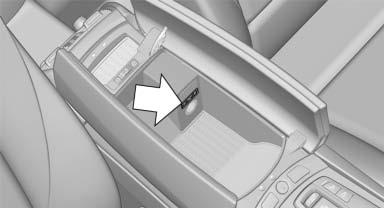
The AUX-IN port is in the center armrest.
Connect the headphones or line-out connector of the device to the jack plug.
Playback
1. Connect the audio device, switch it on and
select a track on the audio device.
2. "CD/Multimedia"
3. If necessary "External devices".
4.  "AUX front"
Volume
The volume of the sound output is dependent on the audio device. If this volume differs markedly from the volume of the other audio sources, it is advisable to adjust the volumes.
Adjusting the volume
1. "CD/Multimedia"
2. If necessary "External devices".
3. "AUX front"
4. "Volume"
5. Turn the controller until the desired volume
is set and press the controller.
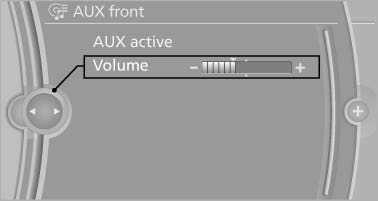
5. Turn the controller until the desired volume is set and press the controller.
See also:
The BMW 6-Series Coupe: a sports car boasting outstanding dynamics and a
fascinating heritage.
The BMW brand's large Coupe once again embodies the essence of dynamic
capability and exclusive driving pleasure in a stylish and luxurious two-door
design. The new BMW 6-Series Coupe represents t ...
Vehicle equipment
All standard, country-specific and optional
equipment that is offered in the model series is
described in this chapter. Therefore, equipment
is also described that is not available in a vehicle,
e ...
Battery replacement
Use approved vehicle batteries
Only use vehicle batteries that have been
approved for your vehicle by the manufacturer;
otherwise, the vehicle could be damaged and
systems or functions may no ...