
Playback
Filling the CD/DVD* player
Insert the CD/DVD with the printed side up. Playback begins automatically.
Reading can take a few minutes with compressed audio files.
Starting playback
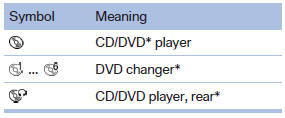
A CD/DVD is located in the CD/DVD player or DVD changer*.
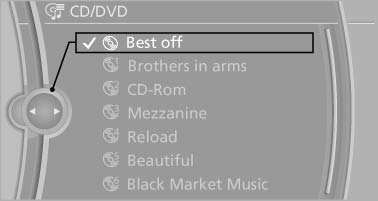
1. "CD/Multimedia"
2. "CD/DVD"
3. Select the desired CD or DVD.
Playable formats
- DVD: DVD-ROM, DVD-R, DVD+R, DVDRW, DVD+RW, DVD-R DL, DVD+R DL, DVD audio (video part only), DVD video*.
- CD: CD-ROM, CD-R, CD-RW, CD-DA, VCD*, SVCD*.
- Compressed audio files: MP3, WMA, AAC*, M4A*.
See also:
Tire inflation pressures
Information for your safetyIt is not merely the tires' service life, but also driving comfort and, to a
great extent, driving safety that depend on the condition of the tires and the maintenance ...
BMW X5: luggage compartment roller
cover
BMW X5: luggage compartment roller
cover
Pull out the luggage compartment roller cover
and hook it into the brackets.
Do not deposit heavy objects
Do not deposit heavy or hard objects on
...
Personal Profile settings
The following functions and settings can be
stored in a profile.
More information on the settings can be found
under:
Assigning the programmable memory buttons
▷ Response of the central l ...