
Timeshift
Approx. one hour of the program being broadcast on the channel currently being listened to is stored in a buffer. Prerequisite: the signal must be available.
The stored audio track can be played with a delay following the live broadcast. When the buffer is full, the older tracks are overwritten. The buffer is cleared when a new channel is selected.
Opening the timeshift function
1. "Radio"
2. "Satellite radio"
3.  "Replay - Time shift"
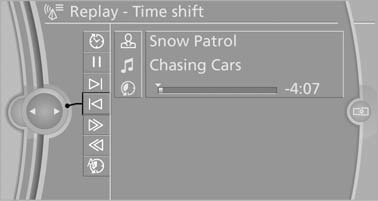
- The red arrow shows the current playback position.
- The time difference to the live broadcast is displayed next to the buffer bar. For live transmissions: "live".
Timeshift menu
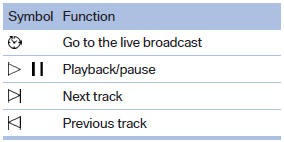
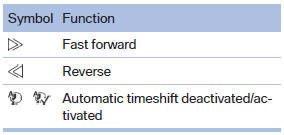
Automatic timeshift
When the function is activated, audio playback is stopped automatically in the event of:
- Incoming and outgoing telephone calls.
- Activation of the voice activation system.
- Muting.
The audio playback then continues with a time delay.
To activate:
1. "Radio"
2. "Satellite radio"
3.  "Replay - Time shift"
4.  "Automatic time shift"
To deactivate: "Automatic time
shift".
See also:
Setting the voice dialog
You can set whether the system uses the standard dialog or a short version.
In the short version of the voice dialog, the responses from the system are given
in abbreviated form.
On the Control Di ...
At a glance
General information
Contacts, appointments, tasks, notes, text messages,
and e-mails from the mobile phone can
be displayed on the Control Display if the mobile
phone provides compatible suppor ...
Comfort position
In the comfort position, the roof is not fully open.
This reduces wind noise in the passenger compartment.
Every time the glass sunroof is opened or closed
completely, it stops in the comfort p ...