
Front ventilation
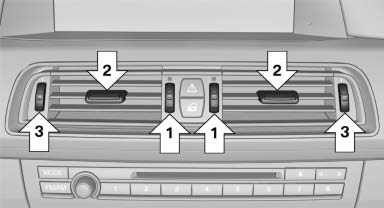
- Thumbwheels for adjusting the temperature,
arrows 1.
Toward blue: colder.
Toward red: warmer. - Lever for changing the air flow direction, arrow 2.
- Thumbwheels for opening and closing the vents continuously, arrows 3.
Ventilation levels
- Draft-free ventilation:
Thumbwheel, arrow 3, in level :
the air
current is fanned out.
:
the air
current is fanned out. - Maximum air volume:
Thumbwheel, arrow 3, in level
 :
the air is
partially fanned out and partially bundled.
This maximizes the air supply.
:
the air is
partially fanned out and partially bundled.
This maximizes the air supply. - Direct ventilation:
Thumbwheel, arrow 3, in level
 :
the air is
bundled and can be directed to a specific
point.
:
the air is
bundled and can be directed to a specific
point.
Adjusting the ventilation
- Ventilation for cooling: Adjust the vent to direct the air in your direction, e.g., if the vehicle interior is hot from the sun.
- Draft-free ventilation: Adjust the vent to let the air flow past you.
See also:
Storage compartment
A storage compartment is located under the
armrest between the front seats and, depending
on the vehicle's equipment, also a cover for the
mobile phone cradle or the snap-in adapter.
Details on ...
Sound output
Switching on/off
When the ignition is switched off: press ON/OFF
button on the radio.
Muting
When the ignition is switched on or the engine
is running: press the ON/OFF button on the
radio. ...
M Dynamics
The 1M's dynamics are typical M — balanced and controllable overall. The car
enters turns with practically no understeer, and rear traction can be broken
loose through both acceleration and lift. ...