
Manual release
The parking brake can be released manually in the event of a power failure or electrical fault.
 Before releasing, secure the vehicle
against rolling
Before releasing, secure the vehicle
against rolling
Before releasing the parking brake manually, and whenever you park the vehicle with the parking brake released, ensure that position P of the automatic transmission is engaged.
Secure the vehicle in a manner appropriate to the inclination of the road, e.g., with a wheel chock; otherwise, there is the danger of the vehicle rolling.
Unlocking
1. Remove the release tool from the tool kit.
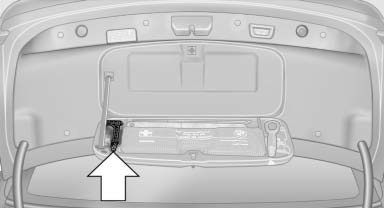
2. Raise the floor panel in the cargo area.
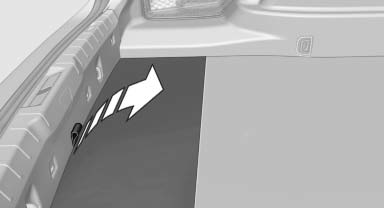
3. Take out the floor trim in the cargo area, removing the screws with the release tool, arrows.
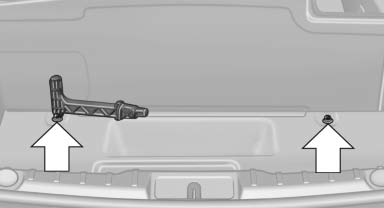
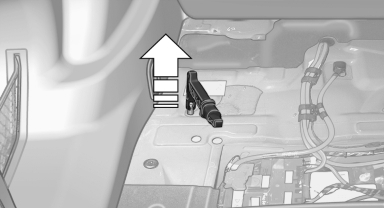
4. Place the release tool on the release point, arrow.
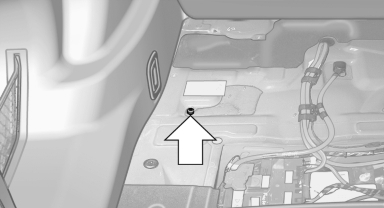
5. Forcefully pull the release tool up against the resistance until you notice a marked increase in the resistance and the parking brake releases audibly.
Have the malfunction corrected
If the parking brake has been released manually in response to a malfunction, only technicians can return it to operation.
Have the malfunction corrected by your service center.
See also:
Reference
This chapter contains technical data, short
commands for the voice activation system, and an
index that will quickly take you to the information
you need. ...
Route criteria
General information> You can influence the calculated route by selecting certain trip criteria.
> Route criteria can be changed during destination entry and during route guidance.
> Street ...
Wheels and tyres
The new BMW 3-Series Sedans are factory-fitted with attractively styled,
high-quality alloy wheels. The BMW 335i and BMW 328i run on 17-inch Star-spoke
wheels carrying 225/50 R17 tyres. The BMW 32 ...