
Programmable memory buttons
General information
The iDrive functions can be stored on the programmable memory buttons and called up directly, e.g., radio stations, navigation destinations, phone numbers and entry points into the menu.
The settings are stored for the remote control currently in use.
Saving a function
1. Highlight the function via the iDrive.
2.  Press the desired button for
more
than 2 seconds.
Press the desired button for
more
than 2 seconds.
Running a function
Press the button.
The function will run immediately. This means, for example, that the number is dialed when a phone number is selected.
Displaying the button assignment
Use a finger to touch the buttons. Do not wear gloves or use objects.
The key assignment is displayed at the top edge of the screen.
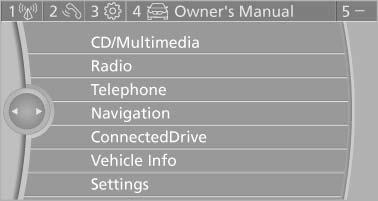
- To display short information: touch the button.
- To display detailed information: touch the button for an extended period.
Deleting the button assignments
1. Press buttons 1 and 8 simultaneously for
approx. five seconds.
2. "OK"
See also:
Reading out loud
Text messages, e-mails, appointment entries,
tasks, and notes can be read out loud.
1. Select the desired message, appointment,
task, or note.
2. Select the symbol.
The following options are a ...
Switching on/off manually
Switching on/off manually
Press the button.
▷ On: the LED lights up.
▷ Off: the LED goes out.
The PDC is shown on the Control Display.
Switch on the backup camera via the iDrive. ...
Backup camera
The concept
The backup camera provides assistance in parking
and maneuvering backwards. The area behind
the vehicle is shown on the Control Display.
System limits
Check the traffic situation as ...