
Control Display
Notes
► To clean the Control Display, follow the care
instructions.
► Do not place objects close to the Control
Display; otherwise, the Control Display can
be damaged.
Switching off
1.  Press the button.
2. "Switch off control display"
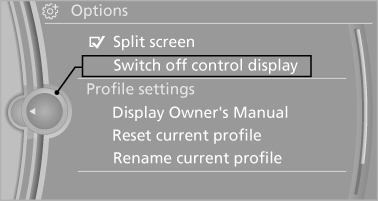
Switching on
Press the controller again to switch the screen back on.
See also:
X3 in the Market
As you can probably guess by now, the market has caught up with and in many
ways passed the X3. That said, if it weren't for BMW's initiative, this segment
might not even exist today, let alone of ...
In the Cabin
Because each was equipped with the optional Sport Package, both of our test
cars had "multi-contoured" power sport seats, which we found comfortable. An
additional seat adjustment, which ...
Roadside Assistance
Service availability
Roadside Assistance can be reached around the
clock in many countries. You can obtain assistance
there in the event of a vehicle breakdown.
Roadside Assistance
The Roadside ...