
Received calls
Displaying calls
The 20 calls that were last received are displayed.
1. "Telephone"
2. "Received calls"
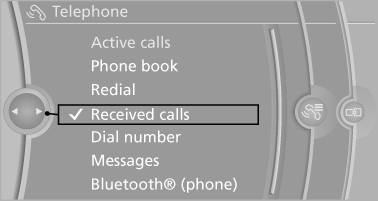
Calling a number from the list
Selecting an entry.
The connection is established.
Deleting a single entry or all entries
The erasure of entries depends on the mobile phone.
1. Highlight the entry.
2. "Options" Open.
3. "Delete entry" or"Delete list"
Saving an entry in the contacts
1. Highlight the entry.
2. "Options" Open.
3. "Store as new contact" or "Add to existing
contact"
4. Select the type of number: "Home",
"Business", "Mobile" or "Other"
5. Complete the entries if necessary.
6. If necessary, "Store contact in vehicle".
See also:
Compartments in the doors
Do not stow any breakable
objects
Do not store any breakable objects, e. g.
glass bottles, in the compartments, or there is
an increased risk of injury in the event of an accident. ...
Automatic headlamp control
Switch position : the low beams
are switched
on and off automatically, e.g., in tunnels, in twilight
or if there is precipitation. The indicator
lamp in the instrument cluster lights up.
A blu ...
Terminating destination guidance
1. "Navigation"
2. "Map"
3. "Guidance"
4. "Stop guidance" ...