
Controls
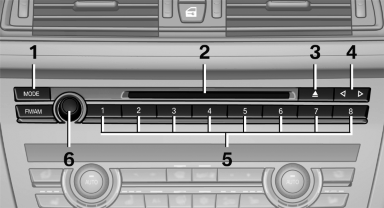
1 Change the entertainment source
2 CD/DVD drive
3 Eject CD/DVD
4 Change station/track
5 Programmable memory buttons
6 Volume, on/off
See also:
Selecting chassis and suspension tuning
Selecting chassis and suspension tuning
Press the button.
The system switches between the two chassis
and suspension tuning settings.
▷ Sport:
The LED in the button lights up and SPORT
...
Strength of the driver's and front passenger airbag
The strength with which the driver's and front
passenger airbags are triggered depends on the
position of the driver's and front passenger
seats.
To maintain the accuracy of this function over ...
Integrated universal remotecontrol
The concept
The integrated universal remote control can operate
up to 3 functions of remote-controlled systems
such as garage door drives or lighting systems.
The integrated universal remote con ...