
Displays in the instrument cluster
Selected program
 The selected program is
displayed
in the tachometer.
The selected program is
displayed
in the tachometer.
Program selection
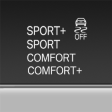 Pressing the button displays a
list
of the selectable programs.
Pressing the button displays a
list
of the selectable programs.
Display on the Control Display
Program changes can be displayed briefly on the Control Display.
To do so, make the following settings:
1. "Settings"
2. "Driving mode"
3. "Driving mode info"
See also:
Volume of spoken instructions
Turn the volume button while giving an instruction
until the desired volume is set.
The setting is stored for the remote control currently
in use. ...
Dynamic Drive
The concept
Dynamic Drive reduces the lateral inclination of
the vehicle that occurs during rapid driving in
curves or during quick evasive maneuvers.
Driving stability and driving comfort are i ...
My contacts
General informationList of all contacts from the vehicle.
Displaying contacts1. "Contacts"
2. "My contacts"
All contacts are listed in alphabetical order. Dependin ...