
Activating/deactivating via iDrive
1. "Settings"
2. "Lighting"
3. "High beam assistant"
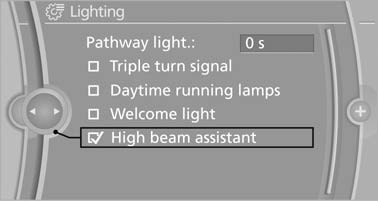
High beam assistant
The setting is stored for the remote control currently in use.
See also:
Vehicle equipment
All standard, country-specific and optional
equipment that is offered in the model series is
described in this chapter. Therefore, equipment
is also described that is not available in a vehicle, ...
Airbags
1 Front airbag, driver
2 Front airbag, front passenger
3 Head airbag
4 Side airbag
5 Knee airbags
Front airbags
Front airbags help protect the driver and front
passenger by responding to fron ...
Display the appointment
1. Select the desired appointment.
2. Scroll through the appointment if necessary:
Turn the controller.
▷
Select the symbol.
Using contact data
Contact data from appointments ...