
ECO PRO
Consistent tuning to minimize fuel consumption for maximum range with maximum driving stabilization.
Comfort functions and the engine controller are adjusted.
The program can be configured to individual specifications.
Activating ECO PRO
 Press button repeatedly until
ECO PRO
is displayed in the instrument cluster.
Press button repeatedly until
ECO PRO
is displayed in the instrument cluster.
Configuring ECO PRO
1. Activate ECO PRO.
2. "Configure ECO PRO"
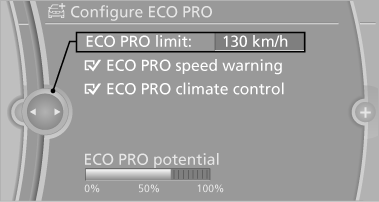
or
1. "Settings"
2. "Driving mode"
3. "Configure ECO PRO"
Make the desired settings.
See also:
Setting the language of the
DVD system
1. Select a CD/DVD track.
2. Press the button.
3. Select "Tone".
4. Press the button.
5. Switch to the top window.
6. Select "Language".
7. Press the button.
8. Select th ...
Engaging the transmission position
Transmission position P can only be disengaged
if the engine is running and the brake
pedal is pressed.
With the vehicle stationary, press on the
brake pedal before shifting out of P or ...
Maintenance
Maintain the vehicle regularly to sustain the road
safety, operational reliability and the New Vehicle
Limited Warranty.
Specifications for required maintenance measures:
▷ BMW Maintenance ...