
Language
Setting the language
To set the language on the Control Display:
1. "Settings"
2. "Language/Units"
3. "Language:"
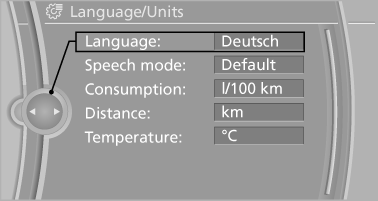
4. Select the desired language.
The setting is stored for the remote control currently in use.
Setting the voice dialog
Voice dialog for the voice activation system
See also:
Apps
At a glance
Certain software applications of a suitable cell
phone can be integrated in the vehicle. These
software applications are displayed on the Control
Display.
Operation can be performed ...
Adjusting the volume
1. "CD/Multimedia", "Radio" or "Settings".
2. "Tone".
3. "Volume settings".
4. Select the desired volume setting.
5. To adjust: turn the control ...
Date
The settings are stored for the remote control
currently in use.
Setting the date
1. "Settings"
2. "Time/Date"
3. "Date:"
4. Turn the controller until the desired ...