
Display
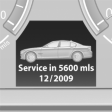 The driving distance or the time
to the next service is displayed
briefly after the ignition is
switched on.
The driving distance or the time
to the next service is displayed
briefly after the ignition is
switched on.
The current service requirements can be read out from the remote control by the service specialist.
Data regarding the maintenance status or legally mandated inspections of the vehicle are automatically transmitted to your service center before a service due date, Automatic Service Request
Detailed information on service requirements
More information on the scope of service required can be displayed on the Control Display.
1. "Vehicle Info"
2. "Vehicle status"
3.  "Service required"
Required maintenance procedures and legally
mandated inspections are displayed.
4. Select an entry to call up detailed information.
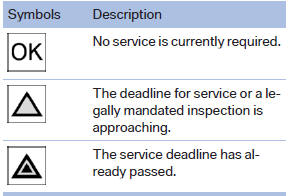
Symbols
See also:
Skipping chapter
1. Press the
button on the remote control
during playback.
2. Select the symbol.
3. Press the button repeatedly,
continuing
until you reach the desired chapter.
Or:
Press the button on ...
Fuel gauge
Fuel gauge
The vehicle inclination may cause the display to
vary.
Notes on refueling ...
Selecting a station manually
Station selection via the frequency.
1. "Radio"
2. "FM" or "AM"
3. "Manual"
4. To select the frequency: turn the controller.
To store the station: press ...