
Overview, instrument cluster with enhanced features
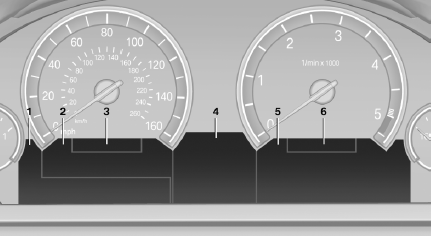
1. Messages, e.g. Check Control
Time
Date
2. Range
3. Computer
4. Navigation display
Service requirements
Miles/trip miles
5. Selection list, for instance radio
Current fuel consumption
Energy recovery
External temperature
6. Transmission display
See also:
Notes
Replacing fuses
Never attempt to repair a blown fuse and
do not replace a defective fuse with a substitute
of another color or amperage rating; this could
lead to a circuit overload, ultimatel ...
Active head restraint
In the event of a rear-end collision with a certain
severity, the active head restraint automatically
reduces the distance from the head.
Reduced protective function
▷ Do not use seat or ...
Ultrasound sensors
Ultrasound sensors
The ultrasound sensors for measuring parking
spaces are located on the wheel arches.
To ensure full operability:
▷ Keep the sensors clean and free of ice.
▷ When ...