
Service history
Perform maintenance work at the service center and have them recorded in the vehicle data. The entries are like a service booklet of the documentation of regular maintenance.
The entered maintenance work can be displayed on the Control Display. Function is available as soon as a maintenance operation has been entered in the vehicle data.
1. "Vehicle Info"
2. "Vehicle status"
3.  "Service required"
4.  "Service history"
Performed maintenance operations are displayed.
5. Select an entry to call up detailed information.
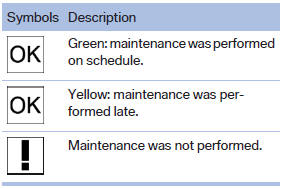
Symbols
See also:
Status display
The current status of the Flat Tire Monitor can
be displayed on the Control Display, e.g.,
whether or not the FTM is active.
1. "Vehicle Info"
2. "Vehicle status"
3. " ...
Managing the favorites
Activating/deactivating the favoritesFavorites can be activated and deactivated
globally and individually.
1. "Satellite radio"
2. "Manage favorites"
3. Sel ...
Setting the clock
1. Press the button. The main
menu is
displayed.
2. Turn the controller until "Settings" is highlighted,
and then press the controller.
3. If necessary, move the controller to the ...