
Comparison with ordinary remote control
The functions can be controlled by pressing the buttons of the remote control or Comfort Access.
Unlocking
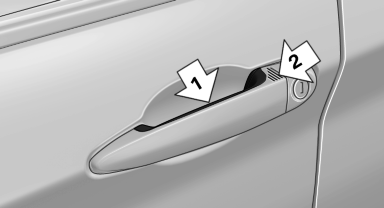
Grasp the door handle on the driver's or front
passenger door completely, arrow 1. This corresponds
to pressing the  button.
Locking
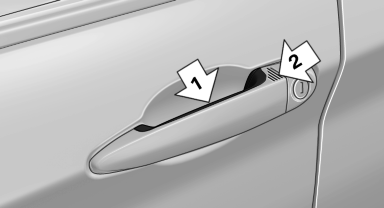
Press the area on the door handle, arrow 2, with your finger for approx. 1 second.
This corresponds to pressing the  button.
To save battery power, ensure that the ignition and all electronic systems and/or power consumers are switched off before locking the vehicle.
Convenient closing
Press the area on the door handle, arrow 2, with the finger and hold it down.
In addition to locking, the windows and the glass sunroof are closed.
 Monitor the closing process
Monitor the closing process to ensure that no one becomes trapped.
Unlocking the trunk lid separately
Press the button on the exterior of the trunk lid.
This corresponds to pressing the  button.
Do not place the remote control in
the
cargo area
Take the remote control with you and do not leave it in the cargo area; otherwise, the remote control is locked inside the vehicle when the trunk lid is closed.
See also:
Automatic deactivation
In certain situations, the Automatic Engine Start/
Stop Function is deactivated automatically for
safety reasons, such as when the driver is detected
to be absent.
Malfunction
The automatic engin ...
Last destinations
At a glance
The destinations previously entered are stored
automatically.
The destinations can be called up and used as a
destination for destination guidance.
Calling up the last destinat
1. ...
Rain sensor
The concept
The time between wipes is controlled automatically
and depends on the intensity of the rainfall.
The sensor is located on the windshield, directly
in front of the interior rearview m ...