
Settings for external devices
1.  Press the
button during playback.
Press the
button during playback.
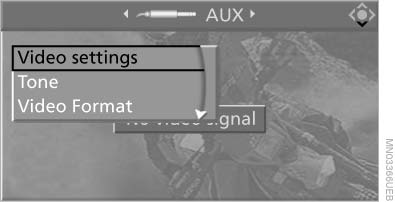
Settings for external devices
2. Make the settings with the remote control:
▷ "Video settings":
▷ "Brightness", "Color", and "Contrast" of
the video playback.
▷ "NTSC color": the color can be adjusted
on an external device with the NTSC
standard.
▷ "Standard": the DVD system can be
adapted to external devices with different
TV standards; to do so, consult the
operating manual of the external device.
▷ "Reset": The settings are reset to the
default values.
▷ "Tone":
▷ "Treble / Bass" and "Balance": separately
adjustable for the left and right
headphones and the infrared headphones.
▷ "Reset": your settings are reset.
▷ After switching to the top window, you
can change other settings.
"Audio": adjust the volume of the external
device to the volume of the CD/DVD
player.
"Language": the system language of the
DVD system.
"Display": background brightness of the
screen.
▷ "Video Format":
▷ "Standard"
▷ "Zoom": full-screen playback.
To exit from the menu:
 Press the buttons
on the remote control.
Press the buttons
on the remote control.
See also:
Adding engine oil
760i/Li: open/close flap
When the flap is closed, it must latch
Filler neck
When the indicator lights up in the instrument
cluster, add 1 US quart/liter of engine oil within
the next 125 mi ...
Switching on/off
Press the button.
On: the LED lights up.
Off: the LED goes out.
The system can issue warnings at speeds above
approx. 30 mph/50 km/h.
The state is stored for the remote control currentl ...
Rear
Opening
Press on the cover.
Emptying
Take out the insert.
Lighter
Push in the lighter.
Danger of burns
Only hold the hot lighter by its knob; otherwise,
there is the danger of getting bu ...