
In the glove compartment
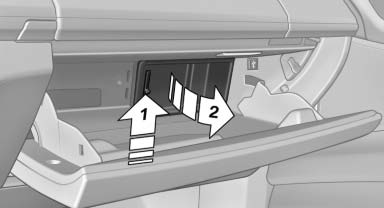
Push the handle up, arrow 1, and open the lid, arrow 2.
See also:
Pinch protection
If the closing force exceeds a specific value as a
window closes, the closing action is interrupted.
The window reopens slightly.
Danger of pinching even with
pinch protection
Even with the pi ...
Fuses
Notes
Replacing fuses
Never attempt to repair a blown fuse and
do not replace a defective fuse with a substitute
of another color or amperage rating; this could
lead to a circuit overload, ul ...
Side airbags
In a lateral impact, the side airbag supports the
side of the body in the chest and lap area. ...