
Odometer, external temperature display, clock
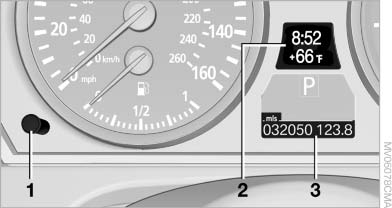
Odometer, external
temperature display, clock
1. Knob in the instrument cluster
2. Time, external temperature, and date
3. Odometer and trip odometer
See also:
Automatic headlamp control
Switch position : the low beams
are switched
on and off automatically, e.g., in tunnels, in twilight
or if there is precipitation. The indicator
lamp in the instrument cluster lights up.
A blu ...
Fuel gauge
The vehicle inclination may
cause the display to vary.
Notes on refueling. ...
Changing wheels
Your BMW is equipped with run-flat tires as standard. This eliminates the need
to change a wheel immediately in the event of a puncture.
For information on continuing to drive with a damaged tire, ...