
Current fuel consumption
Displays the current fuel consumption. You can check whether you are currently driving in an efficient and environmentally- friendly manner.
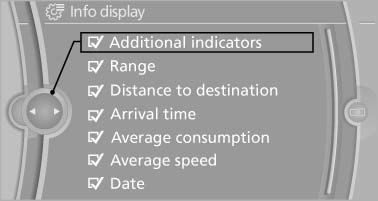
Displaying the current fuel consumption
1. "Settings"
2. "Info display"
3. "Additional indicators"
The bar display for the current fuel consumption is displayed in the instrument cluster.
See also:
Deactivating/activating DTC Dynamic
Traction Control
Activating the Dynamic Traction Control DTC
provides maximum traction on loose ground.
Driving stability is limited during acceleration
and when driving in bends.
Activating DTC
Press the butt ...
Front
Opening
Press on the cover.
Emptying
Place your finger in the depression next to the
ashtray, arrow, and push up at the same time.
The ashtray can be removed.
Lighter
Push in the lighter. ...
Fuel gauge
The vehicle inclination may
cause the display to vary.
Notes on refueling. ...