
Route criteria
General information
► The route calculated can be influenced by
selecting certain criteria.
► The route criteria can be changed when the
destination is entered and during destination
guidance.
► Road types are part of the navigation data
and are taken into consideration when planning
a route, such as when avoiding highways.
► The recommended route may differ from the
route you would take based on personal experience.
► The settings are stored for the remote control
currently in use.
► Destination guidance with traffic bulletins,
refer to page 164.
Changing the route criteria
1. "Navigation"
2. "Map"
3. 

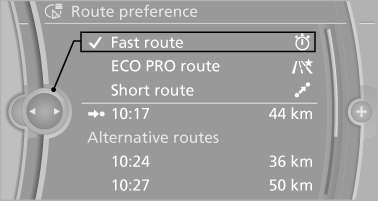
 "Route preference"
4. Select the criterion:
► "Fast route": time-optimized
route,
being a combination of the shortest possible
route and the fastest roads.
► "ECO PRO route": optimized
combination
of the fastest and shortest
route.
► "Short route": short distance,
irrespective
of how fast or slow progress will
be.
► "Alternative routes": if available, alternative
routes are suggested during active
route guidance.
With the Professional navigation system:
the individual suggestions are highlighted in color.
5. Specify additional criteria for the route, if necessary:
► "Avoid highways": highways are
avoided wherever possible.
► "Avoid toll roads": toll roads are avoided
wherever possible.
► "Avoid ferries": ferries are avoided
where possible.
See also:
The concept
This system can replace up to three different
hand-held transmitters for various types of remote-
controlled equipment, such as garage
doors or lighting systems.
The hand-held transmitter signa ...
Programs
The system offers two different programs.
The programs can be selected via Dynamic Driving
Control.
SPORT
Consistently sporty control of the shock absorbers
for greater driving agility.
SPORT+ ...
Status display
1. "Vehicle Info"
2. "Vehicle status"
3. "TPM" ...