
Controls
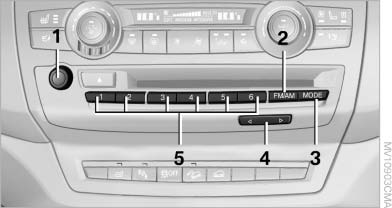
Controls
1 Volume, on/off
2 Change wave band
3 Change entertainment sources
4 Change station/track
5 Programmable memory buttons
See also:
Tow-starting and towing
Automatic transmission: transporting
your vehicle
Note
Your vehicle is not permitted to be towed.
Therefore, contact a service center in the event
of a breakdown.
Do not have the vehicle towe ...
Personal Profile settings
The following functions and settings can be
stored in a profile.
More information on the settings can be found
under:
► Collision warning: warning time, last setting
on/off.
► Ex ...
Care products
Regular cleaning and care contributes significantly to the value retention of
your BMW.
BMW recommends cleaning and caring for your vehicle with products that are approved
by BMW for this purpose ...