
USB interface for data transfer
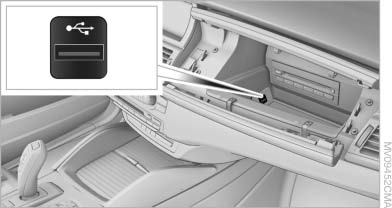
USB interface for data transfer
Port for importing and exporting data, such as music collections, on USB devices.
Observe the following when connecting:
▷ Do not use force when plugging the connector
into the USB interface.
▷ Do not connect devices such as fans or
lamps to the USB interface.
▷ Do not connect a USB hard drive.
▷ Do not use the USB interface to recharge
external devices.
See also:
Service contract
▷ After your contract with BMW Assist has expired,
the BMW Assist system can be deactivated
by the service center without you
having to visit a workshop.
After deactivation, an Emergency ...
Messages
General information
Whether or not text messages and e-mails from
the mobile phone are displayed depends on
whether transmission from the mobile phone to
the vehicle is supported. Text messages an ...
Compact wheel
Safety precautions in the event of a flat tire
or wheel change
Park the vehicle as far as possible from passing
traffic and on solid ground. Switch on the hazard
warning system.
Set the park ...