
Increasing or reducing speed
The speed can be changed in the range from approx. 4 mph/6 km/h to approx. 15 mph/25 km/ h by pressing the accelerator or brake pedal lightly.
A target speed within the same range can be specified using the lever of the cruise control.
On inclines over 10 %, you can reduce the speed to approx. 3 mph/4 km/h. Pull the lever of the cruise control beyond the resistance point, arrow 3.
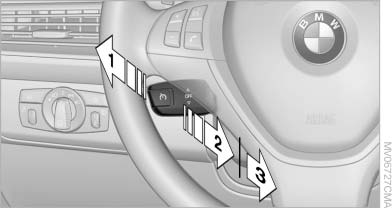
Increasing or reducing speed
1 Increasing speed
2 Pull to the resistance point: reduce the speed to approx. 4 mph/6 km/h
3 Pull beyond the resistance point: on inclines over 10 %, reduce the speed to approx.
3 mph/4 km/h
See also:
Cupholders
Notes
Shatter-proof containers and no hot
drinks
Use light and shatter-proof containers and do
not transport hot drinks. Otherwise, there is the
increased danger of injury in an accident.
U ...
Opening
► Press the switch to the
resistance
point.
The window opens while the switch is held.
► Press the switch beyond the
resistance
point.
The window opens automatically.
Pre ...
Adjusting
Adjusting
1. Fold the lever down.
2. Move the steering wheel to the preferred
height and angle to suit your seating position.
3. Fold the lever back. ...