
Hiding Check Control messages
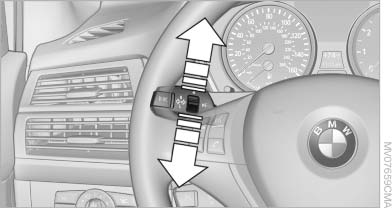
Hiding Check Control messages
Press the button in the turn signal lever up or down.
▷ Some Check Control messages are displayed continuously and are not cleared until the malfunction is eliminated. If several malfunctions occur at once, the messages are displayed consecutively.
These messages can be hidden for approx.
8 seconds. After this time, they are displayed
again automatically.
▷ Other Check Control messages are hidden
automatically after approx. 20 seconds.
They are stored and can be displayed again later.
See also:
Selecting menu items
Menu items shown in white can be selected.
1. Turn the controller until the desired menu
item is highlighted.
2. Press the controller.
Menu items in the Owner's Manual
In the Owner's Manual, ...
BMW X5: rear seats and 3rd row seats Adjusting the height
BMW X5: rear seats and 3rd row seats Adjusting the height
▷ To raise: pull.
▷ To lower: press the button, arrow 1, and
push the head restraint down.
In vehicles equipped with 3rd ro ...
Roller sunblind for rear window
General information
If you are no longer able to move the roller sunblind
for the rear window after having activated
it a number of times in a row, the system is
blocked for a limited time to p ...